 By Dhruvisha J
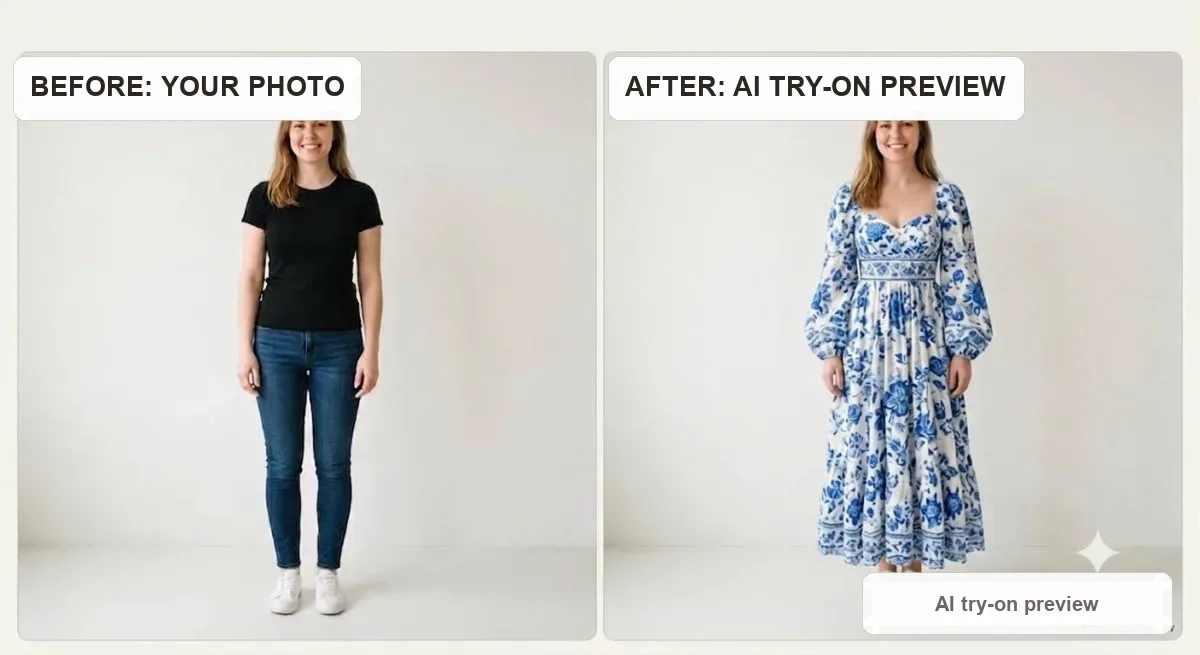
An AI clothes changer lets you swap the outfit in a photo for a different one, so you can see how a piece of clothing looks on you before you buy it or post it. You upload a photo of yourself and a picture of the clothing, and the tool puts that outfit on your body in a few seconds, keeping your face, pose and background the same.
It replaces the old guesswork of shopping online, where you stare at a garment on a stranger and try to picture it on yourself. Instead of imagining, you see. That is the whole idea, and it is why so many people now run a quick change before they add anything to a cart.
What an AI clothes changer is
An AI clothes changer is a virtual try-on tool. It takes two inputs, a photo of a person and an image of a garment, and produces one image of that person wearing that garment. Some people call it an outfit changer, a clothes swap tool or a virtual dressing room, but they all do the same job: change the clothing in a photo while keeping the person recognisably themselves.
This is different from a photo filter or a dress up game. A filter only recolours or adds effects, and a dress up game uses cartoon avatars. An AI clothes changer works on your real photo and a real garment, so the preview actually reflects your body, your coloring and the specific item you are considering.
How an AI clothes changer works
Under the hood, the tool uses a type of image AI trained on millions of photos of people in clothes. When you give it your photo and a garment, it maps the shape of your body, understands the pose you are in, and then renders the new garment onto you so it drapes, folds and sits the way real fabric would. For a deeper look, see how AI virtual try-on works.
The better tools keep three things steady while they change the clothing: your face and hair, your body and pose, and the background behind you. That is what makes the result feel like a real photo of you rather than a generic model. The garment is the only thing that changes.
How to change clothes in a photo, step by step
The process takes under a minute and needs no app or sign up to start.
1. Upload your photo
Choose a clear, full length or half length photo of yourself facing the camera. Good light and a plain background give the cleanest result, which we cover more below.
2. Add the clothing image
Upload the garment you want to try, a product photo from a shop, a screenshot, or a flat lay. The clearer the clothing image, the more faithful the result.
3. Generate and review
The tool renders you in the new outfit in a few seconds. Look at how the length hits your body, how the color reads against your skin, and whether the fit looks right for you.
4. Save or try another
Download the result, or swap in a different garment and compare. Trying three or four options side by side is where the tool really pays off, because you stop guessing and start choosing.
What people use it for
The most common use is online shopping. Before buying a dress, a jacket or a pair of jeans, people preview it on themselves to avoid a return. It is especially handy for pieces that are hard to judge from a model, like a winter coat or a bold color you have never worn.
Beyond shopping, people use it to plan outfits for an event, to test a trend before committing, and to create content. Small brands and sellers also use a clothes changer to show one garment on different looks without a photoshoot. If you run a store, see virtual try-on for fashion brands.
How to get the best result
The quality of your result depends heavily on the two photos you feed in. A few simple habits make a big difference.
Use a clear, well lit photo of yourself
Face the camera in even light, with your whole outfit visible and a simple background. Avoid heavy shadows, extreme angles and busy scenes. For the full checklist, see how to take the perfect photo for virtual try-on.
Pick a clean garment image
A product shot on a plain background works best. If the garment is shown on a model, that is fine, but a flat or ghost mannequin image gives the AI the least to get confused by, so the design transfers more accurately.
Match the garment to your pose
A standing, front facing photo handles almost any garment. Very dynamic poses, like a side profile or arms crossed over the body, are harder, so a relaxed stance gives the cleanest swap.
What it can and cannot do
An AI clothes changer is a preview tool, not a tailor. It shows you color, length, proportion and overall vibe on your body extremely well, which is exactly what you cannot get from a model photo. That alone answers the biggest question: will this suit me.
What it cannot do is tell you your exact size or how a fabric feels in hand. For that, you still read the size chart against your measurements and check reviews. It also works best on normal, wearable clothing; highly structured or sculptural pieces are harder for any tool. Think of the changer as the will this suit me step, and the size chart as the will this fit me step.
Is it really free
Yes, you can change the clothes in a photo for free here, with no app to download and no account needed to start. New users get free try-ons to test it on real outfits, so you can decide whether it fits your shopping routine before anything else. See the full details on our pricing page.
Frequently asked questions
What is an AI clothes changer?
It is a virtual try-on tool that swaps the outfit in a photo. You upload a photo of yourself and an image of a garment, and it shows you wearing that garment while keeping your face, pose and background the same.
Is the AI clothes changer free?
You can try it free here with no app and no sign up to begin, and new users get free try-ons. There are affordable paid credits if you want to run a lot of looks.
Do I need to download an app?
No. It runs in your browser, so you just upload your photo and a clothing image and get the result in seconds, on a phone or a computer.
Will it keep my own face and body?
A good clothes changer keeps your face, hair, body and background, and changes only the clothing, so the result looks like a real photo of you in a different outfit.
What photo works best for changing clothes?
A clear, well lit, front facing photo with your whole body or upper body visible and a plain background. Avoid heavy shadows, busy backgrounds and extreme angles for the cleanest swap.
The bottom line
An AI clothes changer turns the hardest part of shopping online, picturing a garment on yourself, into a few seconds of certainty. Upload your photo, add the clothing, and you see the length, color, fit and feel on your own body instead of on a stranger. Pair that preview with the size chart for fit, and you buy with confidence and return far less.
The best way to understand it is to try it. Upload a photo and swap in an outfit with our free AI clothes changer right now, then explore more with the best virtual try-on apps or learn how virtual try-on reduces returns.
Ready to try it yourself? Upload a photo and see any outfit on you in seconds, and your first try-ons are free. Start a try-on →
One useful style tip a week
What to wear, how to size, and new try-on features. Short, useful, unsubscribe any time.