 By Dhruvisha J
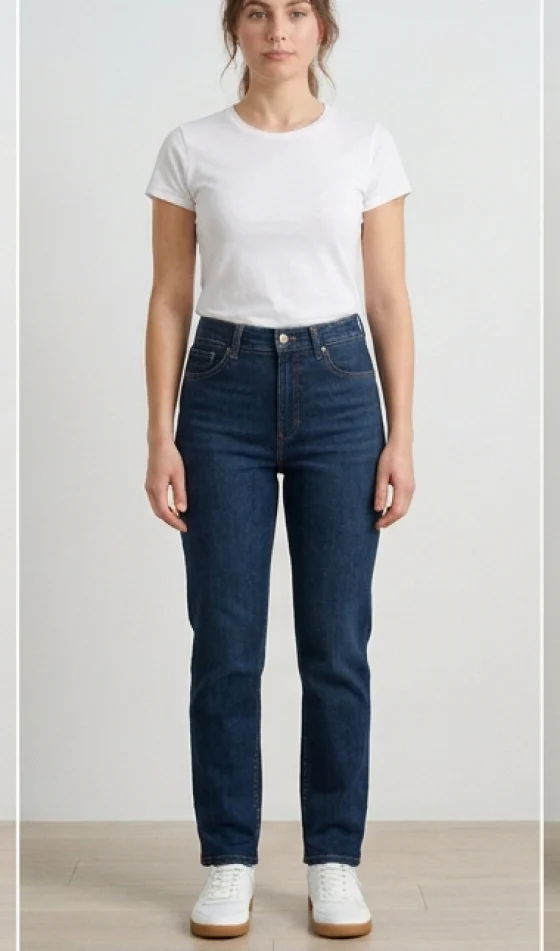
Ask anyone which garment they dread buying online and the answer is almost always the same: jeans. Two pairs in the same labelled size can fit completely differently, the wash looks one way on a screen and another way in daylight, and a cut that flatters one body can swamp the next. So you order three sizes, keep one and post two back. When you learn to try on jeans online with AI, you do not fix sizing entirely, but you remove the biggest unknown of all: how a given pair actually looks on your body.
The idea is simple. You upload a photo of yourself and a photo of the jeans, and the software builds a realistic image of you wearing them. You see the wash, the cut, the rise and the whole silhouette on your own legs before you spend a penny. This guide is an honest walk through what jeans try-on does brilliantly, where you still need a size chart next to it, and exactly how to get a believable result every time.
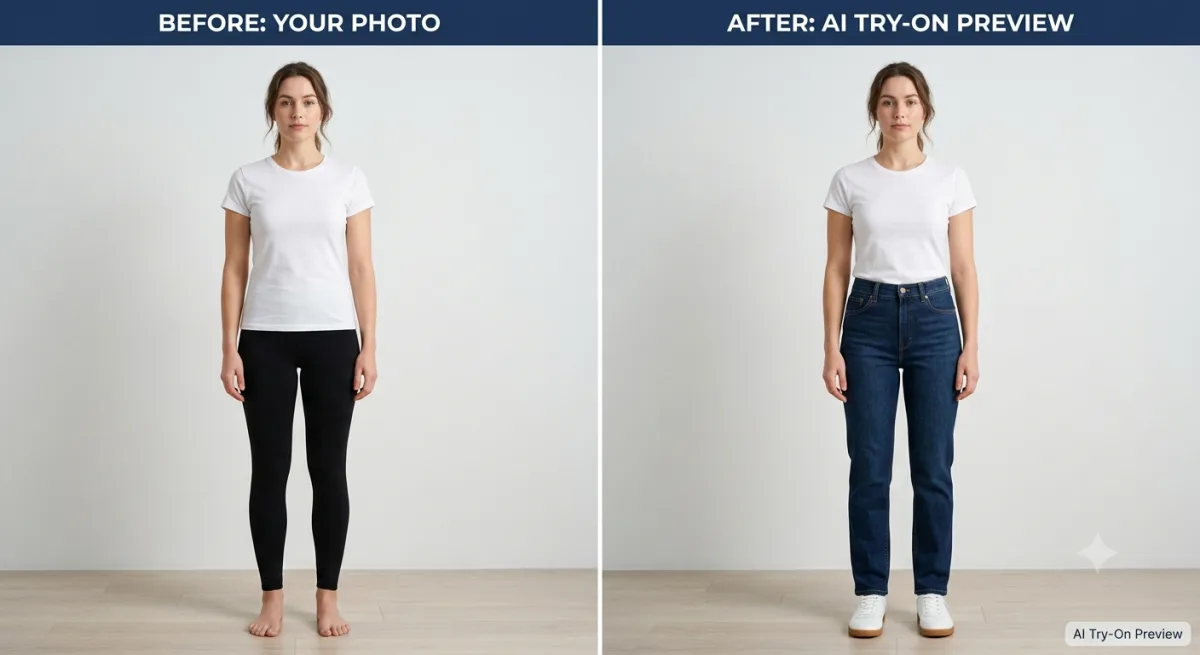
Why jeans are the hardest thing to buy online
Jeans stack up every problem that makes online clothing risky. Denim comes in a long list of cuts: skinny, slim, straight, bootcut, flared, wide-leg, mom, boyfriend, and each one sits differently on the hip, the thigh and the ankle. Rise changes where the waistband lands. Wash changes how the fabric catches light. Stretch content changes how forgiving the fit feels after an hour. A single product photo on a studio model tells you almost none of this about you.
That is why denim carries one of the highest return rates in fashion. You cannot judge the cut on your own frame, so you order on hope and send back whatever misses. A tool that previews a specific pair on your own legs goes straight at that uncertainty. If you also want a grounding in denim sizing before you shop, our guide on how to shop for jeans online pairs well with this one.
What AI jeans try-on can and cannot do
Being honest about scope keeps your expectations in the right place. AI jeans try-on is a visual preview. It shows the wash, the cut, the leg shape and the way a pair sits on your silhouette with real accuracy. It does not measure your waist or promise a perfect fit, and it will not tell you whether the stretch stays comfortable once you sit down. It answers one question a size chart can never answer: does this cut and this wash suit me? The same approach helps with other fit-sensitive pieces, which is why we also have a guide to try on activewear online.
Used that way, it earns its place. You can line up a slim, a straight and a wide-leg pair from the same store and see all three on your own legs in the time it would take to try one in a changing room. If you are curious how the AI turns two photos into that preview, our explainer on how AI virtual try-on works breaks it down step by step.
How to try jeans on your photo in 5 steps
No app, no scanner, no special hardware. A phone photo and a browser are enough. Here is the whole process.
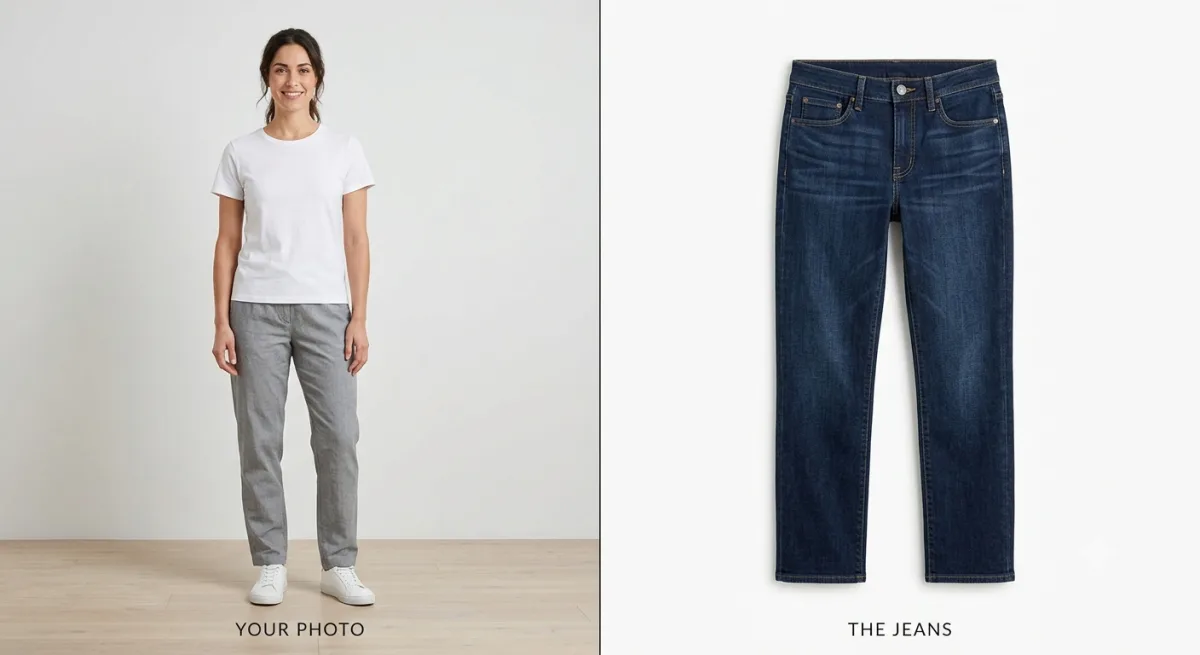
- Pick your photo. Choose a clear, full-body, front-facing picture where your legs are visible from waist to ankle. This is the one input people get wrong most often, so it is worth a second look.
- Pick the jeans image. Grab a clean product shot of the jeans, ideally a flat-lay or a front-on photo on a plain background. The crisper the wash reads, the better your result.
- Upload both. Add your photo and the jeans image to the tool. Nothing installs and nothing downloads.
- Generate. Let the AI process the two images. It usually takes a few seconds.
- Review and iterate. Check the cut and the wash. If the leg shape looks off, swap in a cleaner photo and run it again.
Because denim is a lower-body garment, the thing that matters most is simple: your legs need to be clearly in frame. A photo cropped at the thigh gives the AI nowhere to draw the leg line. Get the inputs right and a free tool that lets you try on clothes online shows you the pair on your own frame in seconds.
A real example, start to finish
Say you have been stuck between a pair of skinny jeans and a pair of straight-leg jeans in the same dark indigo wash. Both look good on the site model, and you honestly cannot tell which suits you. Here is how you settle it in a few minutes instead of ordering both.
- Take one good base photo. You stand against a plain wall in soft daylight, feet slightly apart, wearing a fitted top so your shape reads clearly. Your whole body is in frame, waist to ankle.
- Save both product images. You grab the front-on shot of the skinny pair and the front-on shot of the straight-leg pair, both on a plain background.
- Run the skinny pair first. You upload your photo with the skinny jeans and generate. The preview shows the close cut hugging the ankle. It looks sharp, but a touch narrow for your build.
- Run the straight-leg pair next. Same base photo, different jeans image. The straight leg falls cleaner from the knee and balances your frame better. Now you can see the difference side by side rather than imagining it.
- Make the call, then check the number. You decide the straight leg wins on shape. Before checkout you open the brand's size chart, match your waist and inseam, and read a couple of reviews for fit notes. You order one pair, not two.
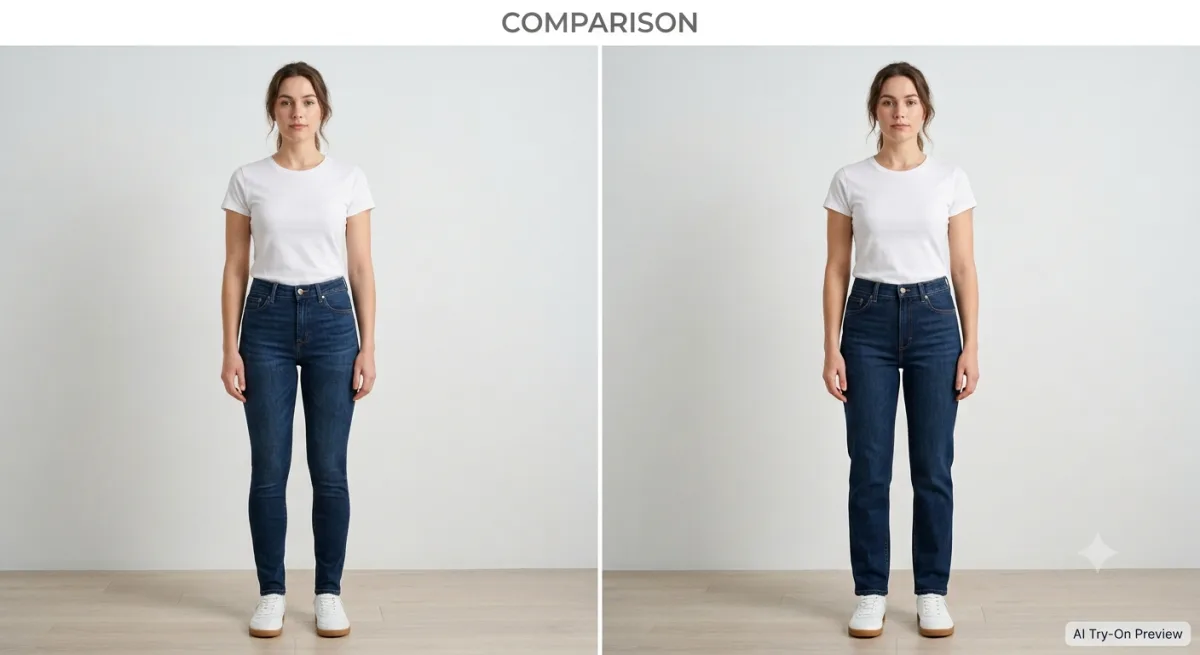
That is the whole point. The try-on settled the style question fast, and the size chart settled the number, so you skipped the order-three-keep-one routine completely.
Tips for different jeans cuts and washes
Each denim cut rewards a slightly different approach, because what matters most shifts with the shape of the leg.
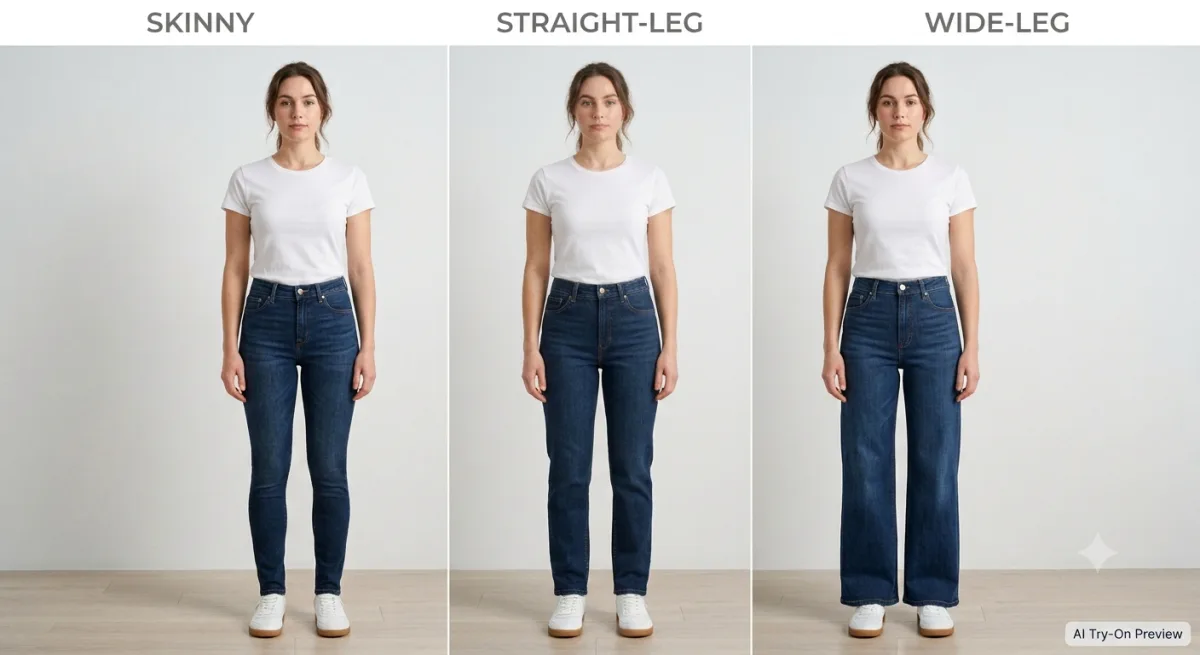
Skinny and slim jeans
Close cuts depend on the AI reading your true leg shape, so stand straight with your feet slightly apart and wear something fitted on top in your base photo. That lets the software place a slim black jean or a slim indigo along your actual leg line instead of guessing at it.
Wide-leg, flared and bootcut jeans
Fuller cuts need room below the knee to render correctly, so use a head-to-toe photo where your feet are visible and your stance is even. Then the AI can show where a flared or wide-leg hem breaks and how the extra volume balances your frame.
Washes and distressing
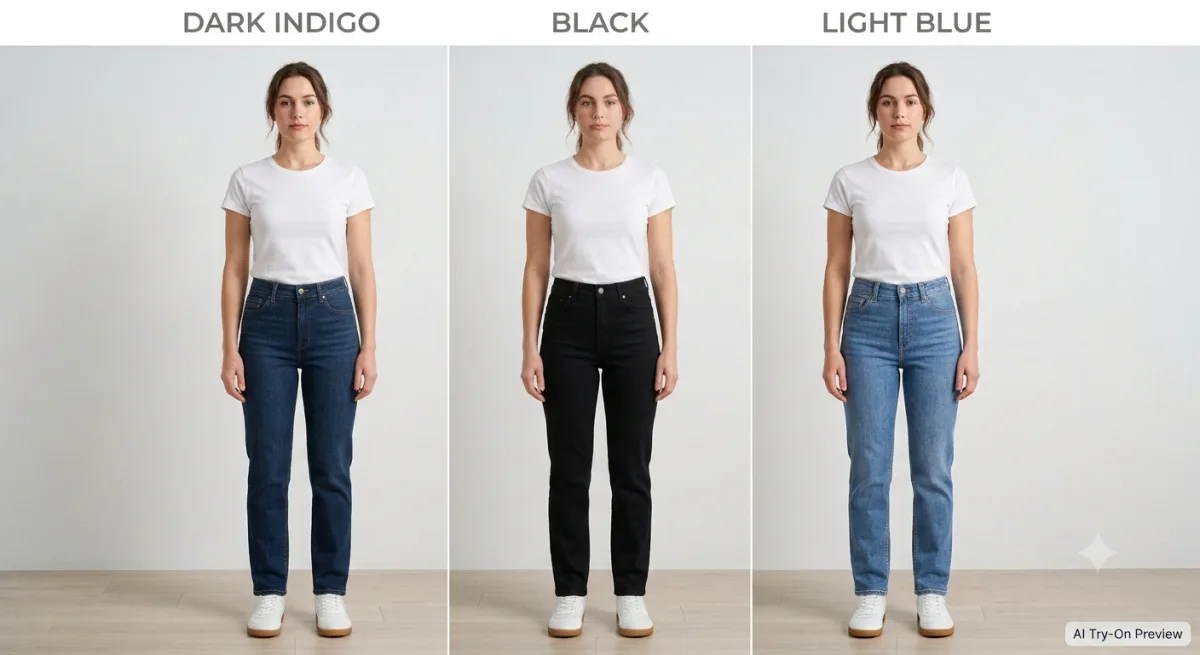
Wash is where a clean jeans image matters most. A well-lit, front-on product photo lets the AI reproduce the true indigo, black or light wash along with any fading or rips. A dim or colour-cast image carries that inaccuracy onto your result, so pick the crispest product shot the retailer offers.
Getting fit and size right
This is the honest part: virtual try-on shows you the look, not the tape-measure fit. Denim sizing is notoriously inconsistent between brands, so once the try-on tells you a cut and wash suit you, take one more step before you order.
- Check the brand's size chart against your own waist and inseam measurements, not just your usual number.
- Read reviews for notes on whether a pair runs small, runs large, or stretches out with wear.
- Note the stretch content, since rigid denim is far less forgiving than a pair with elastane.
- When you sit between two sizes, let the try-on confirm the cut and let the size chart settle the number.
Pairing a visual try-on with the store's measurements is the closest online shopping gets to a real fitting room. The preview kills the "is this even my style?" returns, and the size chart handles the "is this my number?" question.
Mistakes that ruin a jeans try-on
- Cropping at the thigh. Jeans need your legs in frame from waist to ankle. A half-body photo leaves nothing to render.
- Sitting or angled poses. A straight, standing, front-facing stance shows the leg line honestly.
- A folded jeans photo. A product image with the jeans folded in half distorts the cut on your result.
- Colour-cast lighting. A yellow or blue tint changes the apparent wash of the denim.
- Judging fit by eye alone. Always confirm the number with the size chart.
Fix these and your success rate climbs sharply. A useful habit is to glance at your two images and ask yourself, "Are my full legs visible, and is the wash of the jeans clear?" If yes to both, you are set. For more on getting your source photo right, see our guide to the perfect photo for virtual try-on.
Try a pair of jeans on yourself
Reading only gets you so far. Grab a clear, front-facing, full-body photo of yourself in soft light against a plain wall, then find a clean product image of a pair of jeans you have been unsure about. Upload both and watch the result appear in seconds. Swap the skinny for a straight leg and generate again to compare cuts side by side on your own body.
Our free virtual try-on needs no app to install. You sign up for a free account, get free credits to start, and only pay if you want more try-ons. Preview two or three cuts, keep the one that flatters your frame, confirm the size on the chart, and order with real confidence. If you want the broader concept first, our overview of the virtual fitting room puts it in context.
Frequently asked questions
Can I really try on jeans online?
Yes. With AI virtual try-on you upload a photo of yourself and an image of the jeans, and the tool builds a realistic picture of you wearing them. You see the wash, the cut and the leg shape on your own body before you buy, for free, in a browser, with no app required.
Will jeans try-on tell me my size?
No. It shows the look, not the tape-measure fit. Use the try-on to decide whether a cut and wash suit you, then confirm the number against the brand's size chart and reviews, since denim sizing varies a lot between labels.
What photo works best when I try on jeans online?
A clear, full-body, front-facing photo taken in soft, even light against a plain background, with your legs visible from waist to ankle. Stand straight with your feet slightly apart and wear a fitted top so your shape reads accurately. Those choices make the leg line render realistically.
The bottom line
Jeans will always be the trickiest thing to buy online, but you no longer have to buy them blind. When you try on jeans online with AI, you see the exact wash and cut on your own legs before you order, which kills the biggest source of denim returns: the pairs that simply are not your style once they arrive. A skinny, a straight and a wide-leg can all be compared on your frame in seconds.
Keep the division of labour clear: the try-on judges the look, the size chart judges the number. Pair a clean, front-on jeans image with a full-body photo of yourself in soft light, confirm the measurements before checkout, and you swap the order-three-keep-one ritual for something far closer to a real fitting room, one that fits inside your browser.
Ready to try it yourself? Upload a photo and see any outfit on you in seconds, and your first try-ons are free. Start a try-on →
One useful style tip a week
What to wear, how to size, and new try-on features. Short, useful, unsubscribe any time.